In production apps at Walmart, Whataburger and Kwik Trip
See what your app actually did.
In-app devtools for React Native and Expo. See requests, logs and state as your app runs. Open them on the phone, on your desktop, or in your coding agent.
paste into Claude Code, Cursor or Codex · no agent? manual setup
Free plan: $0, no card, account neededDesktop app includedSolo and Business add MCP for your coding agentFlutter in beta









Buoy Desktop shows every device you connect in one window. Free accounts get it too, with limits like the last 25 requests.
shipping in production apps at





 + more
Install only the tools your app needs.
Each tool below is its own package. Tap one to try the real tool on sample data.
Network
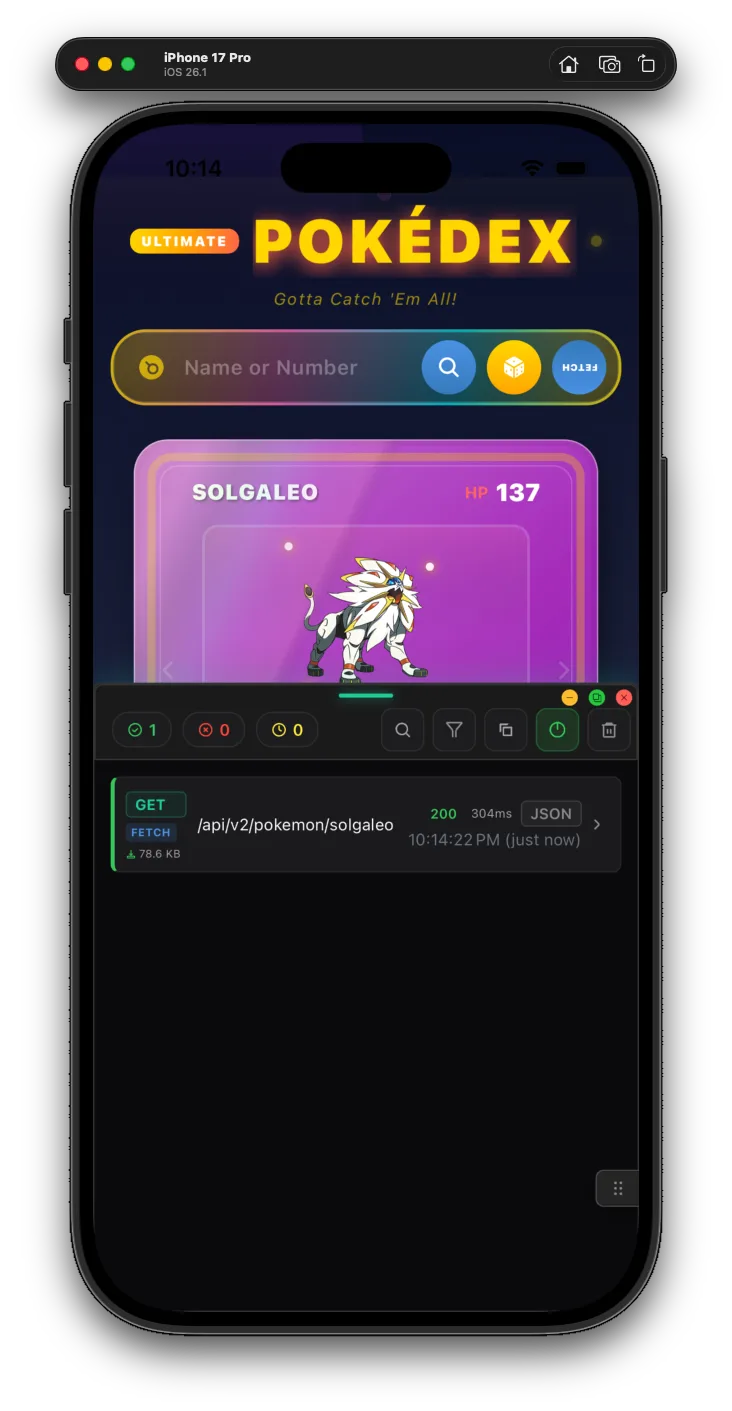
@buoy-gg/networkSee the fetch and XMLHttpRequest calls your app makes, and what came back. You don't need a proxy or a root certificate.
- Axios and GraphQL over HTTP show up too. A native client or an imported expo/fetch may not.
- Open a request to read its headers, body and timing. Free keeps the last 25.
- Filter by status to find the calls that failed.
- Copy a request's full details on a paid plan.
The demo uses sample data. In your app, each tool needs its package, some setup and a free account. Some controls need a paid plan or only work on some platforms.
Your agent adds the tools that match your package.json, and others if you ask. See the full tool list in the docs
Install with one prompt.
Paste it into Claude Code, Cursor or Codex. Your agent asks before it adds anything native, and it won't commit.
- 1. Copy the promptIt is shown in full on this page. It tells your agent to read buoy.gg/install.md.
- 2. Paste it into your agentIt reads package.json, installs the Buoy tools that match your app, and adds the menu to your development build.
- 3. Sign in and open the menuYour agent gives you one sign-in command for a free account, no card. Then it tells you how to check the menu shows a request.
paste into Claude Code, Cursor or Codex · no agent? manual setup
Install Buoy, the in-app devtools for React Native and Expo, in this project.

Read the full instructions first:
  curl -fsSL https://buoy.gg/install.md
Read the raw text, not a summary. If curl is unavailable, use any HTTP tool you have. Ask me to paste the document only if nothing can fetch it.

Do the install yourself: inspect the repo, run the commands, edit the files. Do not hand me steps you can run.

Work out the routine decisions from the repo: package manager, which app to target, where the menu mounts, which Buoy tools match the dependencies already installed. If Buoy is already partly installed, repair and extend it; never add a second mount, provider, or package set.

When instructions conflict, follow this order: what I say here, then the document's rules about which packages exist and what needs my permission, then this project's own constraints, then the rest of the document, then your judgment.

Ask me before: adding a native dependency, opening a browser or creating an account, changing what a production build does beyond what the document specifies, or anything hard to undo. Do not commit.

You are not done when the packages install. Run this project's existing typecheck; add no tooling. Then report what you installed and why, what you skipped and why, every file you changed, what you verified, and the exact steps I take on the device to confirm the menu appears and captures a request.
Let QA and support see the bug too.
QA and support open the same menu on their own phones. Development builds work on the Free plan. TestFlight and store builds need Solo or Business.
Inspect the running app
A bug only happens in production. You add a console.log, ship a build, wait, and guess again.
with buoy
- Open Network and Console in the release build that has the bug (paid plan)
- See the requests Buoy caught, with headers and bodies
- Benchmark two versions of your code on a real device and compare them
- Let Claude Code, Cursor or Codex read the running app through MCP (paid plan)
 Network
Debug release builds.
You pick who sees it.
Some bugs only show up in the build your users have. With Solo or Business, supported React Native tools run in release builds too. Your backend must still approve any action that needs special access. Flutter tools only run in debug builds for now.
- QA and support can use it on TestFlight and internal builds
- Desktop sync stays off in release builds until you turn it on in code
- Most tools work in release builds. Render counts and network overrides stay off.
import { FloatingDevTools } from '@buoy-gg/core'

<>
  {/* your app */}
  {user.isStaff && <FloatingDevTools />}
</>Start free. Pay when you need more.
Free works in development builds, on the phone and in Desktop, up to Free limits. Solo and Business add MCP and supported React Native release builds.
In-app inspection and Desktop access, with Free tier limits.
- Keeps the last 25 requests
- Your own custom tools
- Buoy Desktop, same limits
- Needs a free account, no card
Let your coding agent see and control your app. Use Buoy in supported React Native release builds.
- Everything in Free
- No caps on requests or history
- MCP, so Claude and Cursor can use Buoy
- Supported React Native release builds
$0 today · card required · first charge on day 14 · 30-day refund
The same tools on a company license you can expense.
- Everything in Solo
- Talk to Buoy's maker, lead dev behind apps for Walmart, Whataburger, Wayfair, Kwik Trip & more
- Your bugs fixed first, custom tools on request
- $39 a seat at 10+ seats, $35 at 20+, site license at 50+
$0 today · card required · first charge on day 14 · 30-day refund
Weekend Pass: paid tool features are free every Saturday and Sunday with a free account. You don't need a card. Release builds still need Solo or Business.
In school or a bootcamp? Solo is free while you study. How to get it
volume pricing from 10 seats · Solo is for one developer paying for it · Business can be expensed
Questions, answered.
Does the Free plan expire?
No. Free has no time limit and needs no card, only a free account. It works in development builds, on the phone and in Buoy Desktop, up to Free limits such as the last 25 requests. Solo and Business add MCP, more tool features and supported React Native release builds.
Do I need a card?
Not for Free. The 14-day trial on Solo or Business needs a card. You pay $0 today and the first charge comes on day 14. Cancel before then from your dashboard and you pay nothing. Paid plans also have a 30-day money-back guarantee, once per customer.
Will it work in my app?
Yes, if it's an Expo or bare React Native app on React Native 0.70 or newer and React 18 or newer. Core and Network are JavaScript only, so they run in Expo Go. A few tools ship native code and need a development build. Each tool's docs page says what it needs.
Will Buoy show up for my users?
No, not on Free. Without a paid license the menu shows nothing in a release build. On Expo, the setup keeps a free key out of release builds. A paid key lets it run in release builds, so your app must decide who can open it, such as staff only.
Does it run in production?
Yes, with Solo or Business, for supported React Native tools in release builds. Your app decides who can open Buoy, such as staff only, and your backend must check any action that needs special access. Sending release data to Desktop takes an extra setting. Flutter tools only run in debug builds for now.
Do I need a proxy or a certificate?
No. The React Native network tool records fetch and XMLHttpRequest calls from inside the app, so Axios and GraphQL over HTTP show up too. First install the package and sign in. Requests that skip those two, like expo/fetch imported directly or native clients, may need their own setup.
Where does our users' data go?
Nowhere near us. What your app captures, like requests, logs, storage and state, stays on the phone, in Buoy Desktop on your computer and with your coding agent. Buoy's servers only check that your key is valid, free or paid, and register each device once with its platform and OS version. In development, a daily install ping sends a random install id, the Buoy version, the platform and your plan, and you can turn it off. Ask Buoy sends context to the AI model you set up.
Do QA and support need to know how to code?
No. A developer sets up the tools once. Then QA and support open the menu in the app and use it. Some tasks need extra setup in your app. Some need a paid plan, like editing storage or using Buoy in a TestFlight build.
Can support act as a customer in the app?
Yes, if your backend allows it. The Impersonate tool uses your own user search and your own impersonation flow. Your backend decides who can use it and which accounts they can open.
Can we build our own tools?
Yes, and it's free. Add a tool to the apps prop of FloatingDevTools: an id, a name, an icon and your own React component. A feature-flag panel is one example. Your app and backend still decide who can use each action.
Does it work with Flutter?
Yes, in beta, in debug builds only. Supported Flutter tools connect to Desktop and MCP once your account and app setup are done. MCP needs a paid plan. The Flutter tool list is not the same as React Native's, so check the Flutter docs.
Does it work on Apple TV and Android TV?
Yes, in beta. On a TV, Buoy draws nothing on the screen, so your D-pad focus order stays as it is. You use it from Buoy Desktop instead. There, a TV Remote presses the D-pad for you and a Focus Inspector helps with focus bugs. Pressing the remote from Desktop needs a paid plan. On a real Apple TV it can record presses but not replay them.
Put Buoy in your app today.
Paste one prompt into your agent to install it. Free never expires and needs no card. Solo and Business start with a 14-day trial.
paste into Claude Code, Cursor or Codex · no agent? manual setup
Free plan: $0, no card, account neededDesktop app includedSolo and Business add MCP for your coding agentFlutter in beta
30-day money back on paid plans, no questions asked