Documentation
All but React Native are in beta.
 Ask Buoy
- Camera
- Native Profiler
- Environment Inspector
- Events Timeline
 Console
- Sentry
- Network Monitor
- Storage Explorer
 Time Machine
 Scenarios
- Bug Links
- Memory Leaks
- Clock
- Lifecycle
- OTA Update Inspector
- Location
- Permissions
- Route Inspector
- Highlight Updates
- Bench
- JS Top
 React Query DevTools
 Redux DevTools
 Zustand DevTools
 Jotai DevTools
- Images
- Assets
 Impersonate Tool
- Image Overlay

This tool is in test. It is not on npm yet.
It needs Buoy Pro and expo-updates for SDK 56.
It has passed tests on iOS and Android.
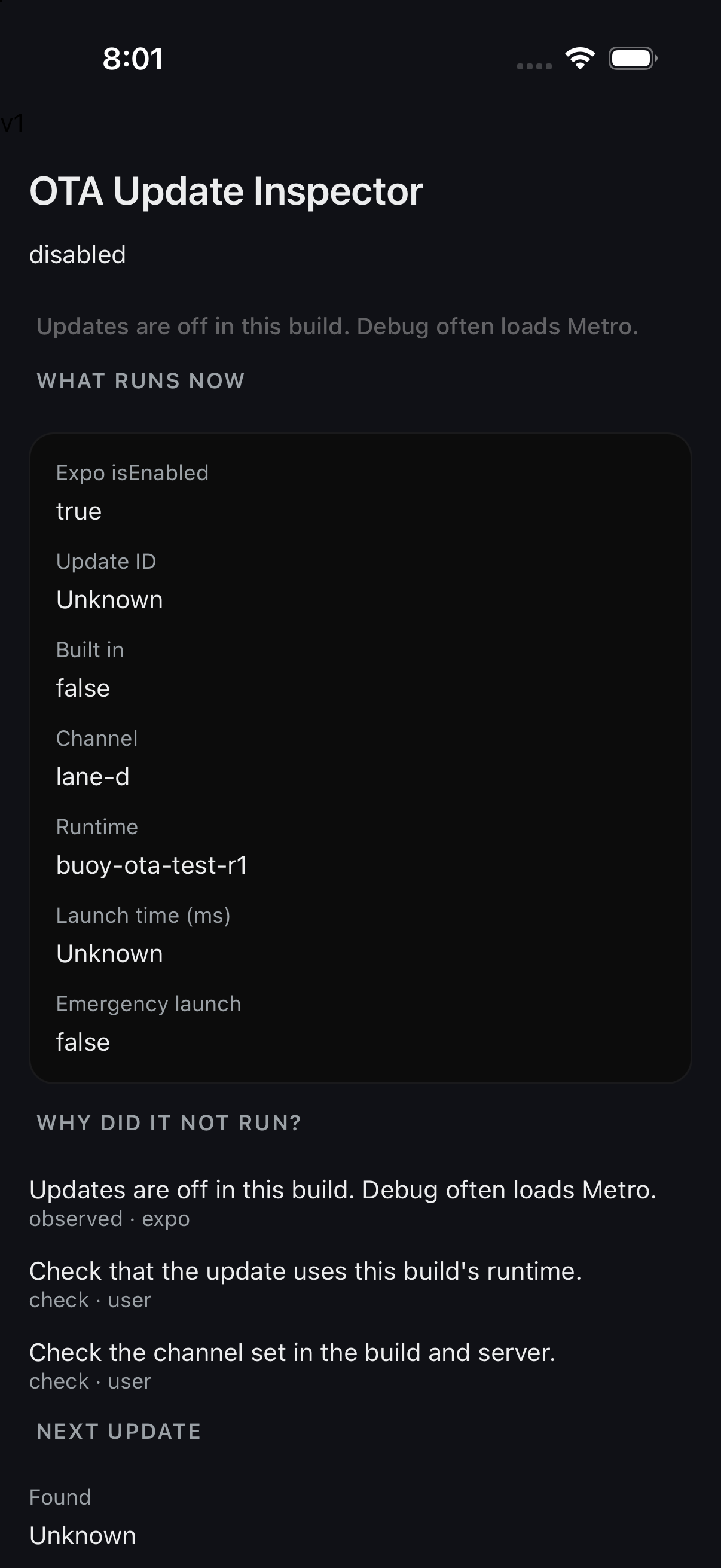
What you see
Open OTA Updates in the Buoy menu. The top shows the update that runs now. It shows the ID, channel, runtime, and launch time. It also shows a built in or emergency launch.
The next part shows found and saved updates. These may differ from the one that runs now. You can see check and fetch faults, too. The details show a small manifest summary. They do not copy the whole manifest or its secrets.
The tool can mount with no Expo update package.
It then shows what is missing.
Plain Debug loads Metro. Update actions are off there.
Some dev clients report isEnabled=true but still block checks.
Buoy keeps that fact and shows the disabled state.
Set up the tool
Once this package ships, add @buoy-gg/ota-inspector to your app.
Core finds it and mounts its Expo state hook.
You do not need to keep the tool open.
Use an app that already has expo-updates set up.
Adding Expo native code needs a new native build.
Expo Go cannot run this update test flow.
You may pass config hints at app start:
import { configureOtaInspector } from '@buoy-gg/ota-inspector';

configureOtaInspector({
  config: {
    updateUrl: 'https://updates.example.com/manifest',
    requestHeaders: { 'expo-channel-name': 'preview' },
  },
  expected: { runtimeVersion: '1', channel: 'preview' },
});
import { configureOtaInspector } from '@buoy-gg/ota-inspector';

configureOtaInspector({
  config: {
    updateUrl: 'https://updates.example.com/manifest',
    requestHeaders: { 'expo-channel-name': 'preview' },
  },
  expected: { runtimeVersion: '1', channel: 'preview' },
});
Hints are labeled. They are not native readback.
URL query text and header secrets stay hidden.
Only expo-channel-name is shown in clear text.
Saved changes from a prior launch may be unknown.
Check, fetch, and apply
- Tap Check now to ask the update server.
- Tap Fetch update to save the update.
- Tap Reload to apply, then Apply.
Reload restarts the app. Unsaved work may be lost. Buoy checks the saved ID before it reloads. If that ID changed, read it and try again. Only one update action can run at a time.
A server may send rollBackToEmbedded.
Fetch it, then tap Apply server rollback.
Buoy has no way to pick an old cached update.
Why did it not run?
The tool labels facts, target checks, and things to check. A runtime fault needs a known target to compare. A generic Expo rejection does not prove a runtime fault. Use Compare a target to give the runtime or channel. A saved update still needs a reload to run. An emergency launch shows the reason Expo gave.
Change the source
Set headers sends the full header map to Expo.
Keys must be baked into the native build.
A channel change uses the expo-channel-name header.
A left out key is cleared. It is not merged.
Clear header change passes null to Expo.
It resets headers but keeps a saved URL change.
URL changes need two opt ins:
- The native build sets
disableAntiBrickingMeasures: true. - The host passes that hint and
allowURLOverride: true.
Keep both off in normal builds.
Use them only in a known test build.
Clear URL change passes null to Expo.
It resets both the URL and the headers.
Expo saves source changes through app restarts.
A URL reset does not delete cached updates.
Desktop, MCP, and Ask Buoy
Desktop shows the same view for the chosen device.
An offline view cannot send actions.
MCP uses get_ota_state and ota_action.
Ask Buoy uses the same tool actions.
All action paths need Pro on the device.
{"action":"reload","params":{"expectedType":"new","expectedUpdateId":"<saved-id>"}}
{"action":"reload","params":{"expectedType":"new","expectedUpdateId":"<saved-id>"}}
Use expectedType: "rollback" for a server rollback.
Other actions are check, fetch, setHeaders, setURL, and setExpected.
setHeaders takes {requestHeaders: {...}} or {requestHeaders: null}.
setURL takes {configOverride: {updateUrl, requestHeaders}} or {configOverride: null}.
setExpected takes {runtimeVersion, channel}. Empty text clears a target.
Release builds block Expo writes by default. This rule also applies to the on-device tool. The host must opt in at app start:
configureOtaInspector({ allowActionsInRelease: true });
configureOtaInspector({ allowActionsInRelease: true });
To turn writes off again, pass false.
A queued reload stops if this opt-in is revoked.
An Expo call already in flight cannot be stopped.
URL changes still need both flags listed above.
Sync writes also need externalSync.releaseActions:
externalSync={{
  enableInRelease: true,
  releaseActions: ['ota-update-inspector'],
}}
externalSync={{
  enableInRelease: true,
  releaseActions: ['ota-update-inspector'],
}}
Read Expo's update guide and update protocol for the server and build rules.